Overwatch Game Guide 2025 – Best Tips & Tricks for Gameplay
Overwatch is one of the most exciting and action-packed team-based shooter games ever created. Since its release, it has captured millions of players around the world with its fast-paced gameplay, colorful heroes, and strong teamwork mechanics. Whether you are a beginner or an experienced player, this Overwatch Game Guide 2025 will help you understand the basics, master your aim, and play like a pro. Let’s dive into everything you need to know to dominate the battlefield in Overwatch.
GameOverview of Overwatch
Overwatch is a first-person shooter (FPS) developed and published by Blizzard Entertainment. It was first released in 2016 and later evolved into Overwatch 2, bringing updated graphics, new heroes, and improved gameplay systems. The game is available on PC, PlayStation, Xbox, and Nintendo Switch platforms.
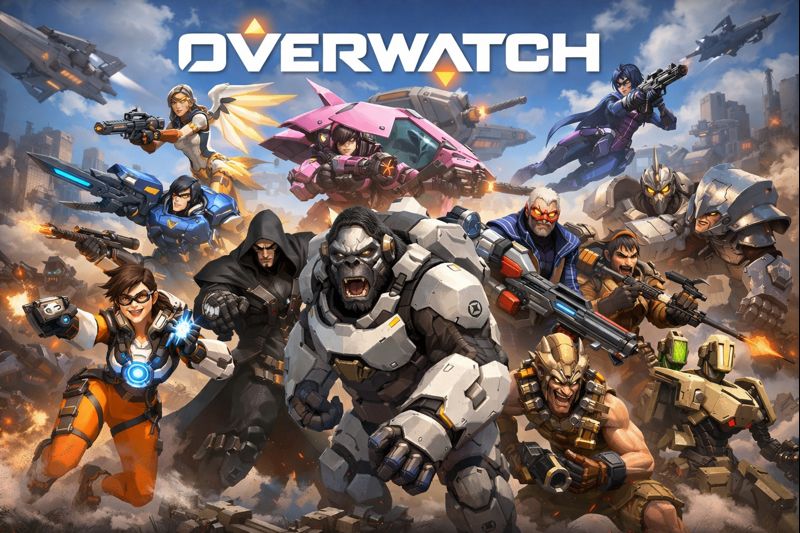
In Overwatch, players join 5v5 matches where teamwork and hero abilities play a key role. Each player selects a unique hero from various roles—Tank, Damage, and Support—and must work together to complete objectives and defeat the opposing team.
Overwatch Gameplay Guide
The gameplay of Overwatch is centered around team coordination, hero abilities, and map strategy. Each hero has different weapons, skills, and ultimates that can change the course of a match.
- Objective: Capture points, escort payloads, or defend specific areas depending on the game mode.
- Controls: Movement (WASD), shooting (left click), abilities (E/Q/Shift), and ultimate (Q or assigned key).
- Gameplay Style: Fast-paced, objective-driven, and teamwork-based. Success depends on understanding your hero’s role and communicating with teammates.
If you are new, start with Training Mode to learn each hero’s skills and practice aiming before joining competitive matches.
Key Features
- Over 35 unique heroes with different weapons and playstyles
- 5v5 multiplayer matches that focus on teamwork
- Dynamic maps with different objectives and strategies
- Cross-platform play between PC and console players
- Regular seasonal events, new heroes, and balance updates
- Competitive mode for ranked play and skill-based matchmaking
- Stunning visuals and smooth animation powered by Blizzard’s graphics engine
Tips & Tricks
- Learn Multiple Heroes: Don’t rely on one hero. Understanding different roles helps you adapt to team needs.
- Communicate with Your Team: Use voice or text chat to share strategies and enemy positions.
- Use Cover Wisely: Always stay near walls or barriers to avoid being an easy target.
- Manage Your Ultimate: Don’t waste it! Combine ultimates with teammates for maximum impact.
- Focus on Objectives: Eliminations are great, but winning comes from completing objectives.
- Stay Aware of Enemy Ultimates: Pay attention to what abilities opponents have used.
Best Setting for Smooth Gameplay
For the best Overwatch experience, having smooth FPS and low input lag is essential.
- Graphics: Set texture and effects quality to Medium or High based on your GPU.
- Resolution: 1080p or higher for clarity.
- Frame Rate: Cap FPS to match your monitor’s refresh rate (e.g., 144 Hz for 144 FPS).
- V-Sync: Turn off for lower input delay.
- Mouse Sensitivity: Start around 4.0–6.0 and adjust based on comfort.
- Field of View (FOV): Set to maximum (usually 103) for better visibility.
- Network Settings: Enable “Reduced Buffering” and “Limit Frame Rate to Monitor Refresh Rate” for stability.
How to Improve Aim
Good aim is the difference between victory and defeat in Overwatch. Here’s how you can sharpen your skills:
- Use Aim Training Tools: Spend time in the training range or use custom aim maps.
- Find Your Ideal Sensitivity: Lower sensitivity allows better control for tracking targets.
- Practice Tracking: Use heroes like Soldier: 76 or Tracer to improve tracking aim.
- Warm-Up Routine: Practice for 10–15 minutes before matches to get your hands ready.
- Crosshair Settings: Choose a small, bright crosshair for better focus.
- Watch Pro Players: Learn aiming techniques and positioning from top streamers.
- Stay Calm: Don’t panic—steady aim and timing are more important than speed.
Mostly Asked Questions
Is Overwatch free to play?
Yes, Overwatch 2 is free-to-play with optional cosmetic purchases.
What are the system requirements for Overwatch on PC?
You’ll need at least an Intel i5 or AMD Ryzen 5 CPU, 8GB RAM, and a GTX 960 or equivalent GPU.
How many heroes are in Overwatch?
As of 2025, there are over 35 heroes across three main roles: Tank, Damage, and Support.
Can I play Overwatch cross-platform?
Yes, you can play with friends across PC, PlayStation, Xbox, and Nintendo Switch.
How often does Blizzard update Overwatch?
Frequent updates include new heroes, seasonal events, and balance patches every few months.
Visitor Recommended:Mecha Break
Conclusion
Overwatch remains one of the most thrilling and strategic shooters in 2025. Its mix of hero abilities, teamwork, and high-speed action keeps players coming back for more. Whether you’re aiming to climb the competitive ladder or just have fun with friends, this guide will help you play smarter and perform better. So grab your favorite hero, jump into the arena, and show your skills in Overwatch.